A Deep Dive into Lightbox Popups: Benefits, Best Practices, Examples & SEO Strategies for Higher Conversions

Md Al Amin
Md Al Amin is the Founder and Lead…

In this article
Lightbox popups are overlay windows that appear on a webpage while dimming the background to focus user attention on a specific message or call-to-action. They are widely used for lead generation, promotions, and announcements because they reduce distractions and significantly increase conversions.
Studies show popup conversion rates typically range from 3% to 11% on average, with well-optimized campaigns achieving even higher results.
When implemented correctly, lightbox popups can transform casual visitors into subscribers, leads, and paying customers, making them one of the most powerful tools in modern conversion rate optimization (CRO).
What Are Lightboxes? Popups?
Lightbox popups are modal windows that appear over a webpage, dimming the background to highlight important content. These popups usually require user interaction before continuing, ensuring users notice the message.
Common uses of lightbox popups
- Email subscription forms
- Promotional offers
- Product announcements
- Lead generation forms
- Exit-intent offers
- Content upgrades
- Event registrations
Lightbox popups are designed to capture user attention while maintaining a clean and focused browsing experience.
Why Lightbox Popups Work So Well
Lightbox popups work because they leverage focused attention and interruption psychology. When users are browsing, they are often distracted. A lightbox forces a moment of decision—act or close.
Research shows:
- Average popup conversion rate: ~3–11%
- Lightbox-specific average: ~3.6%
- High-performing campaigns: 15%–300% uplift
This makes them one of the highest ROI CRO tools available.
Key Benefits of Lightbox Popups
Increased user attention
Lightbox popups dim the background, forcing users to focus on a single message. This eliminates distractions and boosts engagement significantly.
Higher conversion rates
Because users must interact with the popup, they are more likely to take action whether signing up, downloading, or purchasing.
Powerful lead generation
Lightbox popups are widely used for email capture, offering incentives like discounts or free resources to grow subscriber lists quickly.
Improved sales and promotions
Ecommerce brands use them to promote limited-time offers, increasing urgency and boosting revenue.
Behavioral targeting opportunities
You can trigger popups based on user behavior—scroll depth, exit intent, or time on page, making them highly personalized and effective.
Common Drawbacks (And How to Avoid Them)
Lightbox popups are powerful but misuse can hurt UX and SEO.
i. Intrusive experience
Aggressive popups can annoy users and increase bounce rates if shown too early.
ii. Mobile usability issues
Poorly optimized popups can frustrate mobile users and harm rankings.
iii. SEO risks
Google penalizes intrusive interstitials on mobile if they block content immediately.
👉 Solution: Use smart triggers + user-friendly design
Best Practices for High-Converting Lightbox Popups
Lightbox popups can be powerful conversion tools when used thoughtfully and strategically. The key is to enhance the user experience while guiding visitors toward meaningful actions.
1. Show the popup at the right moment
Showing a popup too early interrupts the user experience and often leads to immediate dismissal. Timing plays a major role in conversions.
“The best popup appears when the user is already interested, not when they just arrived.”
Delay your popup by a few seconds, trigger it after scroll, or display it when users show exit intent. This approach feels less intrusive and significantly improves engagement.
2. Offer something valuable
Users rarely respond to generic subscription requests. A compelling offer gives them a reason to take action.
Discounts, exclusive content, free guides, and limited-time offers tend to perform much better than simple newsletter invitations.
3. Use clear and benefit-focused copy
Your message should immediately communicate the benefit. Users should understand what they gain within seconds.
“Clarity converts better than creativity.”
A strong headline paired with a short supporting line and a clear call-to-action works best.
4. Keep the design clean and focused
A cluttered popup distracts users and lowers conversions. Focus on a single objective and eliminate unnecessary elements.
Use readable fonts, a prominent call-to-action button, and minimal text to guide users toward conversion.
5. Optimize for mobile users
Many visitors browse on mobile devices. A popup that works well on desktop may frustrate mobile users if not optimized properly.
“A popup that’s hard to close is easy to hate.”
Ensure the popup is responsive, compact, and easy to dismiss on smaller screens.
6. Personalize when possible
Personalization makes your popup feel more relevant and timely.
Tailor popups based on user behavior, location, returning visits, or page content to increase effectiveness.
7. Create urgency
Urgency encourages users to act quickly rather than postponing decisions.
Limited-time offers, countdown timers, and exclusive deals can significantly improve performance.
8. Test and improve continuously
No single popup works perfectly for every audience. Testing helps identify what resonates best.
“Optimization is not a one-time task, it’s an ongoing process.”
Experiment with timing, copy, design, and offers to continuously improve conversion rates.
9. Make closing easy
Allow users to close the popup effortlessly. This improves trust and overall experience.
A visible close option reduces frustration and keeps visitors comfortable on your site.
Real-World Lightbox Popup Examples
Lightbox popups are used by many top brands to capture leads, increase sales, and reduce bounce rates. These real-world examples show how different companies use lightbox popups effectively.
i. Gucci—Minimal luxury Email capture
Gucci uses a clean and minimal lightbox popup offering exclusive updates and early access to new collections. The design focuses on simplicity, with very little text and a strong brand aesthetic. This works well because luxury audiences respond better to subtle and elegant messaging.
ii. Varley — First-order discount popup
Varley displays a lightbox popup offering a first-order discount in exchange for email signup. The popup appears after a short delay and clearly communicates the benefit. This strategy works because visitors immediately understand the value.
iii. Patrick Ta Beauty — Email growth popup
Patrick Ta Beauty uses a simple lightbox popup offering a discount for new subscribers. The popup contains minimal fields, making it quick and easy to complete. This reduces friction and increases signup rates.
iv. Tipsy Elves — Gamified popup
Tipsy Elves uses a spin-to-win lightbox popup that offers random discounts. This interactive format captures attention and encourages engagement. Gamified popups often perform well for ecommerce brands.
v. Dolce & Gabbana — Newsletter signup popup
Dolce & Gabbana uses a simple newsletter popup that aligns with its luxury design. The popup focuses on brand visuals and minimal text, helping maintain a premium feel.
vi. Outer — Segmented Welcome Popup
Outer uses a multi-step lightbox popup that asks visitors about their preferences before collecting emails. This allows better personalization and improves follow-up marketing campaigns.
Lightbox Popups vs Traditional Popups
| Feature | Lightbox Popups | Traditional Popups |
|---|---|---|
| User Experience | Better | Often intrusive |
| Design | Modern | Outdated |
| Engagement | High | Low |
| Conversion Rate | Higher | Lower |
How to Optimize Lightbox Popups for SEO
Lightbox popups can improve conversions, but if implemented poorly, they can hurt search rankings and user experience. Optimizing them for SEO ensures you gain conversions without sacrificing visibility.
Avoid intrusive popups on mobile
Google penalizes intrusive mobile popups that block content immediately after users land on a page. This is part of Google’s effort to improve user experience and accessibility.
To stay SEO-friendly, delay your popup or use smaller banners that don’t cover the main content. This helps maintain both rankings and conversions.
Delay popup timing
Showing popups instantly can increase bounce rates, which may negatively affect SEO performance. Instead, trigger lightbox popups after users spend time on the page or scroll.
Delayed popups create a smoother experience and reduce frustration, helping users engage more with your content.
Use exit intent instead of entry popups
Exit-intent popups appear only when users are about to leave. This approach avoids interrupting content consumption and keeps your page SEO-friendly.
This strategy protects user experience while still capturing potential leads.
Optimize page speed
Heavy popup scripts can slow down your site, which impacts rankings and user satisfaction. Core Web Vitals measure performance factors like loading speed and interactivity.
Use lightweight popup tools, lazy loading, and compressed images to keep your page fast and responsive.
Ensure content accessibility
Search engines prioritize pages where content is easy to access. If your popup blocks content entirely, it can negatively affect SEO.
Make sure users can easily close the popup and continue reading without friction.
Limit popup frequency
Showing popups repeatedly creates a poor user experience and increases bounce rates. Use frequency controls to show popups only once per session or after meaningful engagement.
This improves both SEO signals and user satisfaction.
Use SEO-friendly popup content
Keep popup text relevant to the page content. For example, if a blog discusses email marketing, the popup should offer a related guide or resource.
This improves engagement and reduces bounce rate, which supports SEO performance.
Test and monitor performance
Track metrics like bounce rate, time on page, and conversions after adding popups. Tools like Google Analytics and Google Search Console help measure impact.
Lightbox Popup Optimization Checklist
- Behavioral triggers (not instant popups)
- Single-field forms
- Clear benefit-driven headline
- Mobile-friendly design
- Frequency capping (avoid repeat annoyance)
- Personalized messaging
Supercharge Your Conversions with OptinCraft Lightbox Popups
Looking to turn casual visitors into loyal subscribers and paying customers? OptinCraft is your all-in-one solution for creating high-converting lightbox popups that actually work.
Say goodbye to generic, ignored popups and hello to smart, irresistible offers that engage users exactly when it matters.
Why OptinCraft works
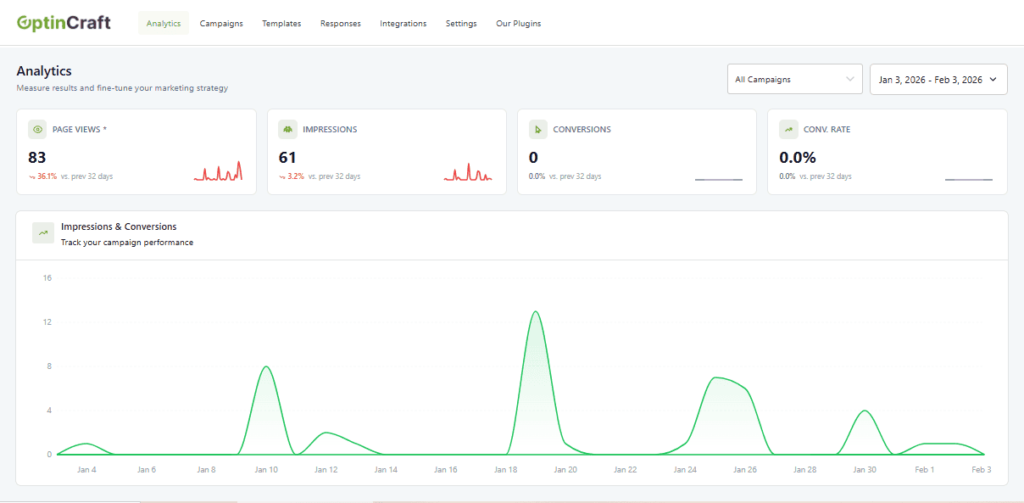
OptinCraft is designed with one goal in mind: maximize conversions without annoying your audience. With intuitive design tools, advanced triggers, and real-time analytics, it ensures every popup delivers measurable results.
- Exit-Intent Popups: Capture leaving visitors before they bounce
- Scroll & Time Triggers: Show popups when users are most engaged
- Click-Activated Offers: Drive action exactly when it matters
Personalization that converts
Generic popups don’t convert — personalized ones do. OptinCraft lets you tailor your popups to match user behavior, device, or location, giving your visitors offers they can’t ignore.
- Device-specific targeting: Desktop, mobile, or tablet
- Page-level targeting for precise promotions
- New vs returning visitor triggers
Fast, lightweight & SEO-friendly
Speed and performance matter. OptinCraft is optimized to load instantly without slowing your site — keeping your visitors happy and your SEO rankings intact.
Stunning, ready-to-use templates
No designer? No problem. OptinCraft offers professionally crafted templates proven to boost engagement and conversions. Simply customize, launch, and watch your results soar.
- Email subscriptions & lead generation
- Flash sales & discount offers
- Event registrations & announcements
- Content upgrades & gated downloads
Track, Test & Optimize
With built-in analytics and A/B testing, OptinCraft empowers you to refine your popups for maximum results:
- Conversion tracking in real-time
- Test different designs & offers
- Optimize messaging for higher ROI
Bottom line: OptinCraft isn’t just a popup tool — it’s a conversion engine that helps you grow your audience, capture leads, and skyrocket sales with smart, user-friendly lightbox popups.
Conclusion
Lightbox popups are a powerful tool for improving user engagement and increasing conversions. When used strategically, they can enhance user experience, capture leads, and boost sales.
However, poor implementation can negatively impact visitors. By following best practices and optimizing for SEO, businesses can maximize the effectiveness of lightbox popups.
Frequently Asked Questions (FAQs)
When should I use lightbox popups?
Use them for email signups, promotions, announcements, and lead generation.
Do lightbox popups increase conversions?
Yes, they focus user attention and typically increase conversion rates.
Are lightbox popups mobile-friendly?
Yes, if designed responsively and optimized properly.
What is the difference between modal and lightbox popup?
A lightbox popup dims the background while modal popups may not always do so.
What is the best type of popup trigger?
Click-triggered popups perform best, followed by AI-based and behavioral triggers.
Share this blog:

About Md Al Amin
Md Al Amin is the Founder and Lead Developer at Crafium, where he leads product architecture and technical innovation. With more than 6 years of experience in software development within the tech industry, he specializes in building scalable, high-performance digital solutions. Outside of work, Al Amin enjoys researching emerging technologies, with a strong interest in AI and next-generation software trends.