The Ultimate Guide to WordPress Popups for Conversion Rate Optimization (CRO)

Md Hamim Khan
Md. Hamim Khan is the Co-Founder and CEO…
In this article
Most websites struggle with the same problem: traffic comes in, but conversions don’t happen.
You might be getting visitors from search, social, or ads, but if they leave without subscribing, buying, or taking action, that traffic is wasted.
This is where WordPress popups come in.
When used strategically, popups can:
- Capture abandoning visitors
- Grow your email list faster
- Increase sales and leads
- Improve overall conversion rates by 2x–10x
But here’s the catch:
Poorly implemented popups annoy users and hurt performance.
In this blog post, you’ll learn how to use popups the right way with a focus on conversion rate optimization (CRO).
What Are WordPress Popups?
A WordPress popup is a message or offer that appears on your website based on a trigger.
Instead of waiting for users to act, popups proactively engage them.
Common Popup Triggers:
- Time delay (e.g., after 10 seconds)
- Scroll percentage (e.g., 50% of page)
- Exit intent (when user is about to leave)
- Click-based (user clicks a button or link)
Popups vs Slide-ins vs Banners
- Popups: Center-screen, high attention
- Slide-ins: Less intrusive, appear from the side
- Bars/Banners: Minimal, top or bottom of screen
Each has its place, but popups are the most powerful for conversions when used correctly.
Why Popups Are Critical for CRO
Conversion Rate Optimization (CRO) is about turning more visitors into customers or subscribers.
Most websites rely on passive elements:
- Static forms
- Buttons
- Links
The problem? Users often ignore them.
Popups solve this by:
- Interrupting browsing patterns (in a controlled way)
- Forcing attention at key moments
- Presenting a clear, focused offer
The Psychology Behind Popups
Popups work because they tap into:
- Attention capture → You can’t miss them
- Urgency → Limited-time offers increase action
- Clarity → One message, one goal
Different Types of Popups
Popups are everywhere in modern websites, especially in eCommerce and lead generation funnels. But not all popups work the same way. Understanding the different types of popups helps you choose the right one for conversions without harming user experience.
1. Entry Popups
Entry popups appear immediately when a visitor lands on a website or after a short delay. They are commonly used to grab attention quickly, promote special offers, or encourage newsletter signups.
While they can be effective, overusing them or showing them too early can annoy users and increase bounce rates. A well-timed entry popup with a clear value proposition performs much better.
2. Exit Intent Popups
Exit intent popups trigger when a user is about to leave the website, usually detected by cursor movement toward the browser bar.
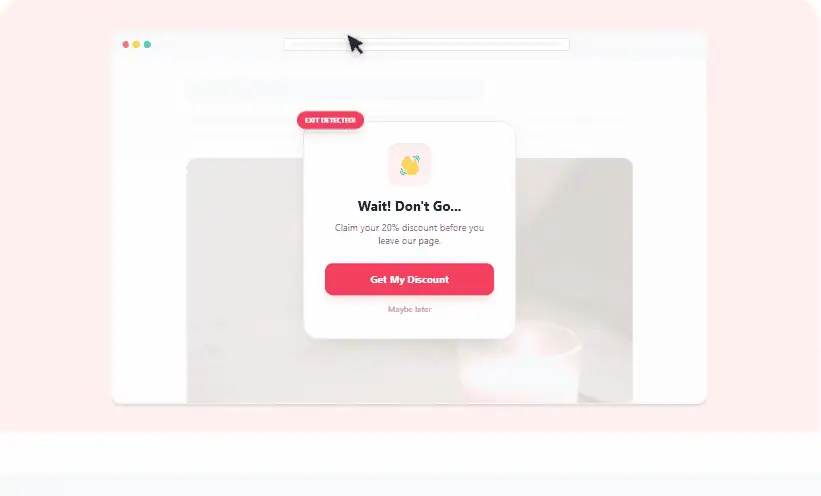
These are powerful for recovering abandoning visitors by offering discounts, free resources, or reminders. Since they appear at the last moment, they do not interrupt the browsing experience as much as entry popups.
3. Scroll-Based Popups
Scroll popups activate when a user scrolls a certain percentage of a page. This type works well because it targets engaged visitors who are already consuming content. For example, showing a popup after 50 percent scroll can capture users who are genuinely interested in what you offer.
4. Click-Triggered Popups
Click popups only appear when a user clicks on a specific button, link, or image. These are also known as two-step opt-ins. They are less intrusive because the user initiates the action. This makes them highly effective for lead generation and conversions since the user already shows intent.
5. Timed Popups
Timed popups appear after a visitor spends a specific amount of time on a page. They are useful for giving users enough time to understand your content before presenting an offer. However, timing is critical. Too soon feels pushy, too late may miss the opportunity.
6. Full Screen Popups
Full-screen pop-ups cover the entire screen, making them impossible to ignore. These are often used for major announcements, limited-time deals, or email capture campaigns. While they have high visibility, they should be used carefully to avoid frustrating users.
7. Floating Bar Popups
Floating bars, also known as sticky bars, appear at the top or bottom of a page and remain visible as the user scrolls.
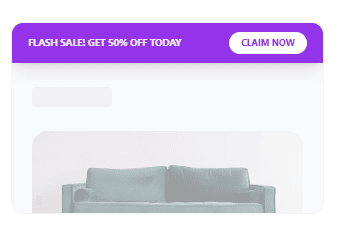
They are less intrusive compared to traditional popups and work well for announcements, promotions, or call-to-action messages.
8. Slide In Popups
Slide-in popups appear from the corner of the screen, usually at the bottom right or left. They are subtle and do not disrupt the user experience as much as full-screen or entry popups. These are ideal for promoting blog subscriptions or highlighting related content.
9. Gamified Popups
Gamified popups include interactive elements like spin the wheel or scratch cards. They make the experience fun and engaging, encouraging users to participate.
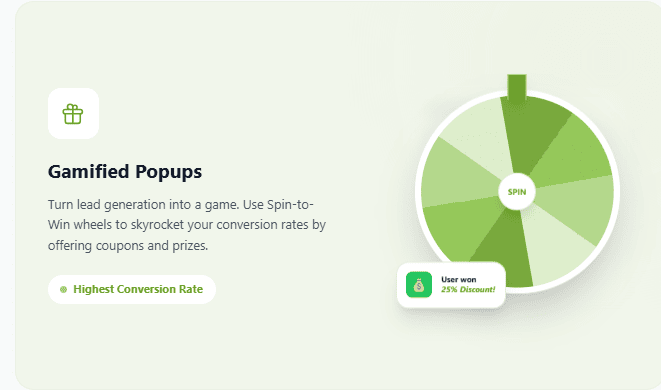
These are especially popular in eCommerce for entertainingly offering discounts.
10. Mobile Specific Popups
Mobile popups are optimized for smaller screens and follow stricter guidelines to avoid penalties from search engines. They often appear as slide-ins, banners, or inline forms instead of full-screen overlays to maintain a smooth user experience.
When to Show Popups on Your Website
Showing popups isn’t just about what you display; it’s mostly about when you display it. Poor timing ruins user experience, while smart timing can dramatically increase conversions. Here’s how to get it right.
i. Show popups after initial engagement
Displaying a popup the second someone lands on your site is usually a mistake. Visitors need a few seconds to understand where they are and what you offer. A delay of 5 to 10 seconds or after a short interaction helps ensure they are not overwhelmed immediately.
ii. Trigger popups based on scroll depth
When a user scrolls down a page, it signals interest. Showing a popup after 40 to 60 percent scroll is often effective because the visitor is already engaged with your content. This timing works especially well for blog posts and long landing pages.
iii. Use exit intent at the right moment
Exit intent is one of the safest and most effective timings. When a user is about to leave, you can present a last-minute offer, discount, or reminder. This does not interrupt the browsing experience and can recover visitors who would otherwise be lost.
iv. Time popups for content consumption
If your page contains valuable content, let users consume some of it before showing a popup. For example, if someone spends 20 to 30 seconds reading, they are more likely to respond positively to a subscription or offer. Timing based on engagement beats arbitrary delays.
v. Show popups on second visit
First-time visitors may not trust your brand yet. Showing popups on their second or third visit increases the chance of conversion because familiarity has already been built. This strategy works well for email capture and product promotions.
vi. Trigger popups on specific actions
User behavior can guide popup timing. For example, clicking a button, viewing a product, or adding an item to the cart are strong signals. Showing a popup at this stage feels relevant rather than intrusive, which improves conversion rates.
vii. Avoid showing popups too frequently
Even the best-timed pop-up can become annoying if shown repeatedly. Use frequency capping so users do not see the same popup multiple times in a short period. This helps maintain a positive user experience and avoids frustration.
viii. Optimize for mobile timing
On mobile devices, screen space is limited. Popups should appear later, be smaller, and less intrusive. Google also penalizes aggressive mobile popups, so timing and format must be handled carefully.
ix. Match timing with intent
Different pages require different popup timing. A homepage visitor may need more time before seeing a popup, while a product page visitor might respond better to quicker offers. Always align popup timing with user intent and page context.
Popup Design Best Practices
Great popup design is where most websites either win conversions or completely lose user trust. It’s not about making something flashy; it’s about making something relevant, clear, and easy to act on. Here’s how to design popups that actually work.
Keep the design clean and focused
A popup should have one purpose and one clear message. Cluttered designs with too many elements confuse users and reduce conversions. Use whitespace, limit text, and guide the eye toward the main action. Simplicity almost always outperforms complexity.
Write a clear and compelling headline
Your headline is the first thing users notice. It should immediately communicate value. Instead of generic text like “Subscribe Now,” focus on benefits such as “Get 20 percent off your first order.” Clarity beats cleverness every time.
Use a strong call to action
Your call to action button should stand out visually and tell users exactly what will happen next. Avoid vague phrases. Use action-driven language like “Claim Your Discount” or “Download the Guide.” Make the button easy to find and impossible to miss.
Design for mobile first
A large portion of users browse on mobile devices, so your popup must be responsive. Avoid full-screen interruptions that are hard to close. Use smaller, well-positioned popups that do not block the entire screen and ensure buttons are easy to tap.
Add a visible close option
Nothing frustrates users more than a popup they cannot easily close. Always include a clear close button or option. This builds trust and reduces bounce rates. A user who can easily exit is more likely to stay on your site.
Use high-quality visuals
Images can increase engagement, but they should support your message, not distract from it. Use relevant product images, illustrations, or subtle backgrounds that enhance the offer without overwhelming the design.
Create a sense of urgency
Adding urgency can significantly improve conversions. Limited-time offers, countdowns, or phrases like “Only today” encourage users to act quickly. However, make sure the urgency feels genuine and not manipulative.
Personalize when possible
Personalized popups based on user behavior, location, or past interactions perform better than generic ones. For example, showing product recommendations or tailored discounts makes the popup feel relevant and valuable.
Limit form fields
If your popup includes a form, keep it short. Asking for too much information reduces conversion rates. In most cases, just an email address is enough to get started. Simpler forms lead to higher completion rates.
Maintain brand consistency
Your popup should match your website’s overall design, including colors, fonts, and tone. A consistent look builds trust and makes the popup feel like a natural part of the user experience rather than an interruption.
Test and optimize continuously
Even well-designed popups need improvement. Run A B tests on headlines, visuals, timing, and call-to-action buttons. Small changes can lead to significant improvements in performance over time.
Some Proven Popup Examples That You Can Keep an Eye On
Here are proven popup examples that actually convert, based on real-world case studies, eCommerce brands, and tested strategies.
1. Discount exit popup (Cart Recovery)
Example:
“Wait, complete your order and get 10% off.”
This is one of the most widely used and effective popup types. It appears when users are about to leave the checkout page and gives them a final incentive to buy.
Why it works:
The user already showed buying intent, so a small discount removes hesitation and pushes them to complete the purchase. Studies show cart abandonment is extremely high, and exit popups can recover a meaningful portion of those users.
2. Minimalist luxury offer popup
Example: Brands like Patrick Ta use clean, elegant popups with a simple “Get 15% off” message and just one input field.
Why it works:
Minimal design builds trust and feels premium instead of pushy. Removing unnecessary fields reduces friction, which increases signups and conversions.
3. Two-step opt-in popup
Example:
“Unlock 15% off” → Click → Then enter email
Instead of showing a form immediately, the popup first asks for a simple click, then reveals the form.
Why it works:
This uses micro-commitment psychology. Once users click, they are more likely to complete the next step, boosting conversion rates.
4. Free gift popup (Higher Perceived Value)
Example:
“Get a FREE whitening wand worth $29.”
Instead of offering a percentage discount, some brands offer a free product.
Why it works:
A tangible gift often feels more valuable than a discount, even if the actual cost is similar. This increases perceived value and signup rates.
5. Countdown timer popup (Urgency Driven)
Example:
“Get 15% off in the next 10 minutes.”
A timer appears alongside the offer to create urgency.
Why it works:
Urgency triggers faster decision-making. Users are more likely to act immediately rather than postpone and forget.
6. Gamified popup (Spin to Win)
Example:
Spin the wheel to win discounts like 10%, 15%, or free shipping.
Why it works:
Gamification increases engagement and makes the experience fun. Users feel rewarded rather than marketed to, which boosts interaction rates.
7. Content upgrade popup (Lead Magnet)
Example:
“Download the free guide before you go.”
Common in blogs and SaaS websites.
Why it works:
Instead of selling, it provides value. Users are more willing to exchange their email for useful content that solves a problem.
8. Social proof popup
Example:
“Join 50,000+ marketers getting weekly tips.”
Why it works:
People trust what others are already doing. Social proof reduces hesitation and increases credibility instantly.
9. Personalized behavior-based popup
Example:
Showing different popups based on:
- Pages visited
- Products viewed
- Time spent
Why it works:
Generic popups are ignored. Personalized ones feel relevant and convert significantly better because they match user intent.
10. Survey or feedback popup
Example:
“Before you go, what stopped you from buying?”
Why it works:
Instead of pushing a sale, it gathers insights. Some users even convert after engaging because it feels conversational rather than promotional.
How to Create a Popup in WordPress (Step-by-Step)
Creating a high-converting popup in WordPress is not complicated when you use the right tool. With OptinCraft, you can design, target, and launch popups without touching code.
Here’s a complete step-by-step guide you can follow.
Step 1: Install and Activate OptinCraft
Start by installing the plugin from your WordPress dashboard.
Go to Plugins → Add New → search for OptinCraft → click Install → Activate.
Once activated, you will see a new menu for OptinCraft in your dashboard where all popup campaigns are managed.
Step 2: Create a New Popup Campaign
Inside OptinCraft, click on “Create New Campaign.”
You will be asked to choose a campaign type. Select Popup as your campaign format. This ensures your design will appear as an overlay on your website.
Give your campaign a name so you can easily manage multiple popups later.
Step 3: Choose a Pre-Built Template
OptinCraft provides ready-made templates designed for conversions.
Pick a template that matches your goal, such as:
- Email subscription
- Discount offer
- Lead magnet download
Templates save time and are already optimized for layout and structure, so you don’t have to design from scratch.
Step 4: Customize the Popup Design
Now comes the most important part. Use the drag-and-drop builder to customize your popup.
Edit the headline to clearly communicate value.
Update the text to match your offer.
Change colors, fonts, and images to align with your brand.
Add input fields if you want to collect emails or user data.
Keep the design clean and focused. One message, one goal.
Step 5: Set Display Triggers
Triggers control when your popup appears. This directly impacts conversion rates.
In OptinCraft, you can set triggers like:
- Time delay (for example, after 5–10 seconds)
- Scroll percentage (for example, after 50 percent scroll)
- Exit intent (when users are about to leave)
- Click trigger (after clicking a button)
Choose triggers based on user behavior instead of showing the popup instantly.
Step 6: Configure Targeting Rules
Targeting ensures your popup appears to the right audience.
You can display popups based on:
- Specific pages or posts
- Product pages
- Categories
- New vs returning visitors
For example, show a discount popup only on product pages or an email signup popup on blog posts.
Step 7: Connect Email Marketing Integration
If your goal is lead generation, connect OptinCraft with your email marketing tool.
Integrate with platforms like Mailchimp or other providers through API. This ensures collected emails go directly into your mailing list automatically.
Step 8: Optimize for Mobile Devices
Before publishing, switch to mobile view inside the builder.
Adjust font sizes, spacing, and button placement.
Avoid full-screen popups that are hard to close.
A mobile-friendly popup is essential for both user experience and SEO.
Step 9: Publish the Popup
Once everything looks good, click Publish.
Your popup is now live and will start appearing based on your trigger and targeting settings.
Step 10: Track Performance and Improve
After launching, monitor how your popup performs.
Check metrics like:
- Conversion rate
- Click-through rate
- Bounce impact
Run A B tests with different headlines, offers, and designs. Even small tweaks can significantly improve results over time.
A/B Testing Popups for Better Conversions
A/B testing popups is one of the most reliable ways to turn guesswork into measurable growth. Instead of relying on assumptions, you test different variations of your popup to see which one actually drives more conversions, whether that means email signups, sales, or clicks.
What is A/B Testing for popups
A/B testing, also known as split testing, is the process of comparing two versions of a popup to determine which performs better. You show version A to one group of visitors and version B to another, then analyze which version generates more conversions.
For example, you might test two headlines, two designs, or even two different offers. Over time, the data reveals what your audience truly responds to, not what you think they prefer.
Why A/B testing popups matters
Popups can either boost your conversions or annoy users enough to leave your site. A/B testing helps you find the balance. By continuously testing and optimizing, you can increase engagement without harming user experience.
It also removes bias from decision-making. Instead of debating internally, you let real user behavior guide your strategy. This is especially useful when scaling campaigns or launching new offers.
What elements should you test?
Not all changes have equal impact, so focusing on high-leverage elements is key.
i. Headline and copy
The headline is often the first thing users read. A small tweak in wording can significantly affect conversions. Try testing emotional versus benefit-driven headlines, or short versus detailed copy.
ii. Call to action
Your CTA button plays a critical role. Test different texts like “Get Started,” “Claim Your Offer,” or “Download Now.” Even subtle changes in wording can influence user intent.
iii. Design and layout
Colors, images, spacing, and overall layout affect how users perceive your popup. A clean, minimal design might outperform a visually rich one, or vice versa, depending on your audience.
iv. Timing and triggers
When the popup appears matters just as much as what it says. Test triggers like exit intent, time delay, scroll percentage, or user inactivity.
v. Offer type
Discounts, free resources, exclusive content, or early access offers can perform very differently. Testing these helps you identify what motivates your visitors most.
How to run an effective A/B test
Start by testing one variable at a time. If you change multiple elements, you won’t know what actually caused the improvement.
Define a clear goal before running the test. Whether it is increasing signups or reducing bounce rate, your objective should guide your experiment.
Ensure you collect enough data. Ending a test too early can lead to misleading results. Let the test run until you have statistically meaningful insights.
Use a reliable tool to manage your tests. Tools like OptinCraft make it easier to create variations and track performance.
Popup Analytics: What to Track
Popups can drive strong results, but only if you measure the right things. Tracking the right metrics helps you balance performance with user experience.
1. Visibility metrics
Start by understanding whether your popup is actually being seen. Track impressions and how often the popup is triggered relative to total visitors. Timing also matters here, since a popup that appears too early or too late can miss its audience entirely. Visibility data helps you figure out if your targeting rules and triggers are working as intended.
2. Engagement metrics
Once the popup is visible, the next question is whether people interact with it. Click-through rate is a core signal, along with whether users begin filling out forms or focus on input fields. These actions show intent. If people see the popup but do nothing, it usually points to weak messaging, unclear value, or poor design.
3. Conversion metrics
This is where effectiveness becomes clear. Measure how many users complete the goal tied to the popup, such as signing up, making a purchase, or downloading something. Conversion rate is the most important number here, supported by total conversions and any revenue tied to those actions. Strong engagement without conversion often means there is friction in the final step.
4. Dismissal and friction metrics
Popups can easily become intrusive, so it is important to track how users react negatively. Look at how often users close the popup, how quickly they do so, and whether they leave the site afterward. A high close rate or immediate exits suggest the popup is poorly timed, irrelevant, or disruptive.
5. Behavioral context
Performance rarely stays consistent across all users. Segment your data by device type, traffic source, and whether users are new or returning. A popup that works well on desktop might fail on mobile, and visitors from ads may respond differently than organic users. Context helps you avoid misleading averages.
6. Experimentation and optimization
Popups should never be static. Test different versions by changing headlines, offers, layouts, and timing. Compare how each variation performs in terms of engagement and conversion. Over time, this process reveals what resonates with your audience instead of relying on assumptions.
7. Long-term impact
Short-term gains do not always mean long-term success. Track how users acquired through popups behave later, including whether they stay engaged, unsubscribe, or return to the site. This helps ensure your popup strategy is building real value rather than just quick wins.
3 Best WordPress Popup Plugins
Choosing the right popup plugin can directly impact your conversions and user experience. The best tools combine design flexibility, smart targeting, and built-in optimization.
1. OptinCraft
OptinCraft stands out for its clean interface and ease of use, making it ideal if you want to launch high-converting popups quickly without dealing with complexity. The drag-and-drop builder is intuitive and lets you design visually, which is especially helpful if you are not technical but still want polished results.
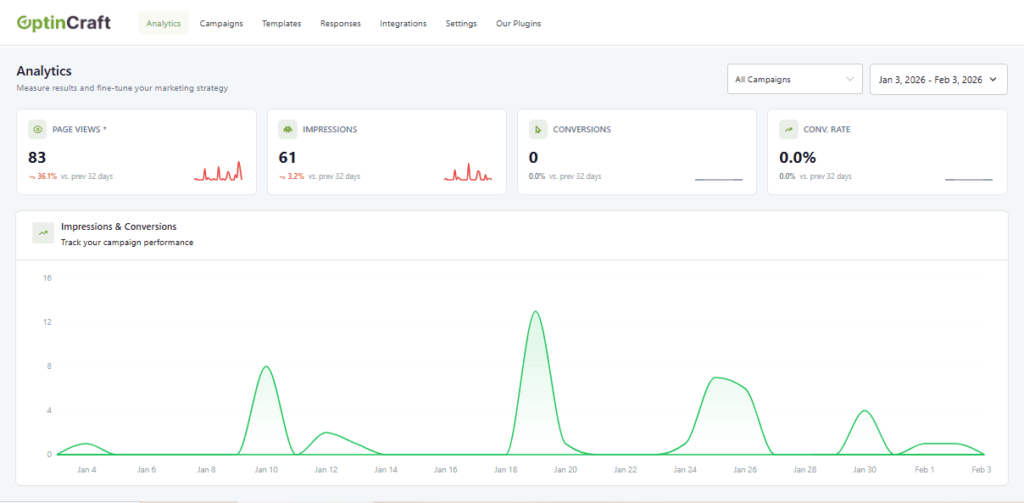
A key strength of OptinCraft is its multi-step campaign capability. Instead of overwhelming users with a single form, you can break the interaction into smaller steps, which often improves conversion rates and user engagement. This approach feels more natural and less intrusive.
It also includes smart targeting features such as page-level targeting, device-based display rules, exit intent, and inactivity triggers. These controls ensure that your popups appear at the right time and place, rather than disrupting the user experience.
Another important advantage is its mobile-first design. You can customize popups specifically for mobile users, which is crucial given how much traffic now comes from smartphones. Overall, OptinCraft is best suited for users who want a streamlined, modern tool that balances simplicity with strong conversion features.
2. WowOptin
WowOptin is built for users who want more power and flexibility in their popup strategy. One of its biggest highlights is its extensive template library, which gives you a wide range of ready-made designs to choose from. This makes it easy to launch campaigns quickly while still maintaining a professional look.
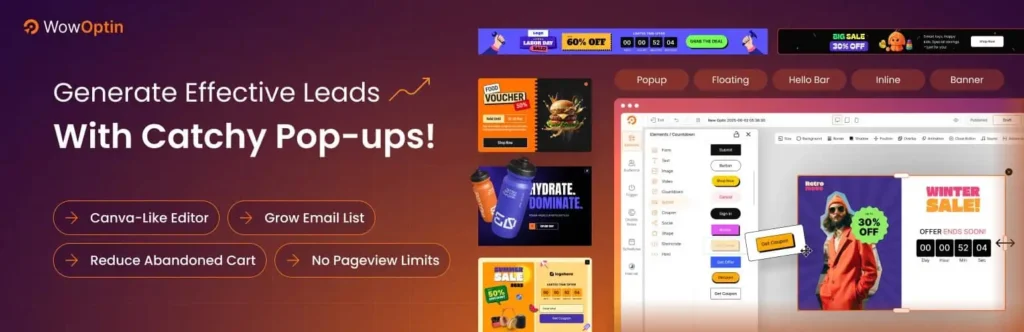
It also incorporates AI-assisted content creation, helping you generate headlines, offers, and copy that are more likely to convert. This can save time and improve results, especially if you are not confident in writing marketing copy.
Where WowOptin really excels is in optimization and targeting. It supports detailed audience segmentation based on device, traffic source, and user behavior. Combined with strong A/B testing capabilities, it allows you to continuously refine your campaigns and improve performance over time.
With advanced triggers like scroll depth, exit intent, and click-based activation, WowOptin gives you precise control over when and how your popups appear. It is best for marketers or growing businesses that want to experiment, analyze, and scale their popup efforts.
3. Poptics
Poptics offers a balanced approach, combining ease of use with practical features that cover most marketing needs. Its builder is simple enough for beginners but still flexible enough to create different types of popups, including opt-in forms and promotional messages.
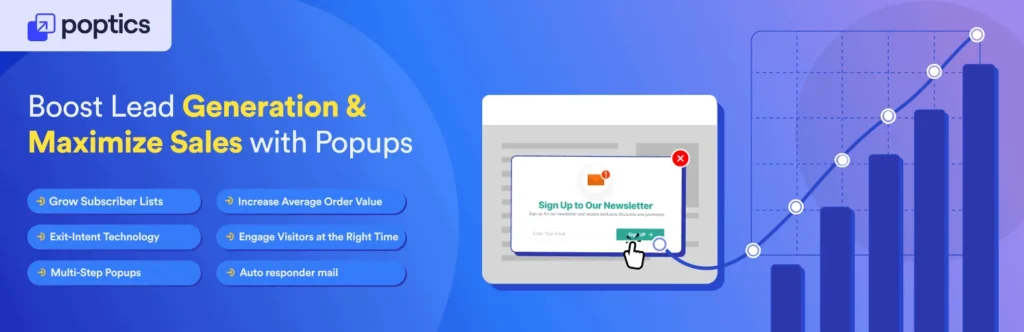
One of its standout areas is eCommerce support. It integrates well with online stores and allows you to create targeted campaigns like upsell offers, cross-sell suggestions, and cart recovery popups. This makes it particularly useful for businesses focused on increasing sales rather than just collecting leads.
Poptics also includes essential triggers such as exit intent, time delay, and scroll-based activation, along with page-level targeting. These features help you deliver the right message at the right moment without overwhelming users.
In addition, it provides built-in analytics and A/B testing, so you can track performance and make improvements without relying on external tools. Overall, Poptics is a strong choice if you want a reliable, well-rounded plugin that works well for both content sites and online stores.
How to Choose the Right Popup Strategy for Your Website
Choosing the right popup strategy is less about design and more about understanding your visitors.
When the message, timing, and intent align, popups feel helpful instead of disruptive.
i. Start with your primary goal
Everything begins with clarity. Decide what you want the popup to achieve, whether it is collecting emails, promoting an offer, or increasing sales. A focused goal keeps your message simple and improves conversions. When a popup tries to do too many things at once, users tend to ignore it.
ii. Match the popup type to user intent
Visitors behave differently depending on where they are in their journey. Someone landing on your site for the first time may respond to a welcome offer, while a returning visitor might be more interested in a discount or new content.
Exit intent popups work best when users are about to leave, while scroll-based triggers are more effective for engaged readers. Aligning the popup with user intent makes it feel natural rather than intrusive.
iii. Get the timing right
Timing can make or break your popup performance. Showing a popup too early can frustrate users, while showing it too late can miss the opportunity entirely. A short delay or a scroll-based trigger often works well because it gives users time to engage with your content before being interrupted.
iv. Focus on clear value
A popup should answer one simple question for the user: what do I get from this. Whether it is a discount, exclusive content, or early access, the value needs to be obvious and immediate. Vague or generic messages tend to underperform because users do not see a compelling reason to act.
v. Keep the experience smooth
Design and usability matter more than most people think. The popup should be easy to close, mobile-friendly, and visually clean. If it feels difficult to dismiss or block the entire experience, users are more likely to leave your site altogether.
vi. Use targeting and segmentation
Not every visitor should see the same popup. Segment your audience based on factors like device, location, traffic source, or behavior. This allows you to show more relevant messages, which increases both engagement and conversions.
vii. Test and improve continuously
No popup strategy is perfect from the start. Test different headlines, designs, offers, and triggers to see what works best. Over time, small improvements can lead to significantly better results. Consistent testing helps you move from guesswork to data-driven decisions.
Final Thoughts: WordPress Popups for Conversion Rate Optimization
Popups are often misunderstood as intrusive tools, but when used strategically, they become one of the most effective levers in conversion rate optimization (CRO). The difference lies in intent and execution. A well-crafted popup does not interrupt the user journey, it enhances it by offering the right value at the right moment.
The ultimate takeaway is simple. Focus on relevance over volume, timing over visibility, and value over persuasion. When your popups are aligned with user intent, thoughtfully timed, and continuously optimized through testing, they stop feeling like marketing tactics and start functioning as helpful touchpoints.
Frequently Asked Questions (FAQs)
Are popups effective for increasing conversions?
Yes—when used correctly, popups can significantly increase conversions. Well-timed and well-designed popups can capture user attention, present targeted offers, and encourage action, often boosting conversion rates by 2x or more. The key is to focus on relevance, timing, and value.
Do popups annoy users?
Popups can be annoying if they are poorly implemented such as appearing too early, showing too frequently, or blocking content. However, when they are targeted, timed properly, and easy to close, they can enhance the user experience rather than harm it.
Do popups affect SEO?
Popups can affect SEO if they are intrusive, especially on mobile devices. Search engines may penalize sites that show full-screen popups immediately after page load. To stay safe, use delayed triggers, avoid blocking key content, and ensure a good user experience.
What is exit-intent technology?
Exit-intent technology detects when a user is about to leave a webpage (e.g., moving the cursor toward the browser bar) and triggers a popup at that moment. It’s commonly used to recover abandoning visitors with offers or lead magnets.
What types of popups convert the best?
Exit-intent popups, click-triggered popups, discount offers, and lead magnet popups tend to perform best. The right choice depends on your goal, such as collecting emails, increasing sales, or reducing cart abandonment.
How many popups should a website use?
Most websites perform best with one or two active popups per page. Using too many can overwhelm visitors and reduce conversions. It’s better to focus on one strong, well-optimized popup strategy.
What is a good popup conversion rate?
A typical popup conversion rate ranges from 2% to 5%. Well-optimized campaigns can reach 5% to 10% or more. The results depend heavily on targeting, timing, and the strength of your offer.
What should a high-converting popup include?
A good popup includes a clear headline, a strong value-driven offer, a simple call-to-action, and minimal form fields. It should be easy to understand and act on within a few seconds.
Are popups effective on mobile devices?
Yes, but they must be carefully optimized. Mobile popups should be smaller, non-intrusive, and easy to close. Poor mobile popup experiences can negatively affect user engagement.
How do I know if my popups are working?
You can measure performance by tracking conversion rate, click-through rate, impressions, and bounce rate. Running A/B tests helps you understand what improvements lead to better results.
Can I personalize popups for different users?
Yes. Modern popup tools allow personalization based on visitor behavior, location, device type, traffic source, and whether they are new or returning users. Personalized popups generally perform better.
Are popups GDPR compliant?
Popups can be GDPR compliant if they collect consent properly, clearly explain data usage, and allow users to opt out. Compliance depends on how the popup is configured and how data is handled.
What is better: popups or embedded forms?
Both have value. Popups are better for grabbing attention and boosting conversions, while embedded forms are less intrusive and always visible. Many websites use both together for best results.
Is A/B testing important for popups?
Yes. A/B testing helps you improve performance by comparing different versions of headlines, designs, timing, and offers. Even small changes can significantly improve conversion rates over time.
Share this blog:

About Md Hamim Khan
Md. Hamim Khan is the Co-Founder and CEO of Crafium, leading the company’s vision, growth, and product strategy across its digital and software ventures. With 5+ years of experience in tech and digital marketing, he focuses on building products, driving sustainable growth, and turning ideas into scalable businesses.