How to Edit or Delete a Popup Campaign

William Tan
William Tan is a Digital Marketer at Crafium,…
In this article
Popup campaigns can quickly become a problem when messages are outdated or offers are no longer relevant. What was meant to engage visitors can instead cause confusion and reduce trust.
When popups aren’t updated or removed on time, they can hurt user experience and cost you valuable conversions. Even small errors can leave a negative impression on your audience.
That’s why it’s important to know how to edit or delete a popup campaign. In this guide, we’ll walk you through the steps to keep your popups accurate, timely, and effective.
So, without further ado, let’s dig deeper.
How to Edit or Delete a Popup Campaign with OptinCraft
Marketing needs evolve over time. A seasonal promotion may end, or a campaign draft may require quick adjustments. The Campaigns dashboard allows you to manage existing popup campaigns efficiently without navigating complex menus.
To edit or delete a popup campaign, follow these steps:
- In the OptinCraft sidebar, click Campaigns.
- Locate the campaign you want to manage. On the far right of the campaign row, click the three-dot Actions icon.
- From the dropdown menu, choose one of the following options:
- Edit—Opens the campaign in the Canvas Builder to update its design or settings.
- Duplicate—Creates an exact copy of the selected campaign.
- Delete—Permanently removes the campaign from your dashboard. A confirmation prompt appears to prevent accidental deletion.
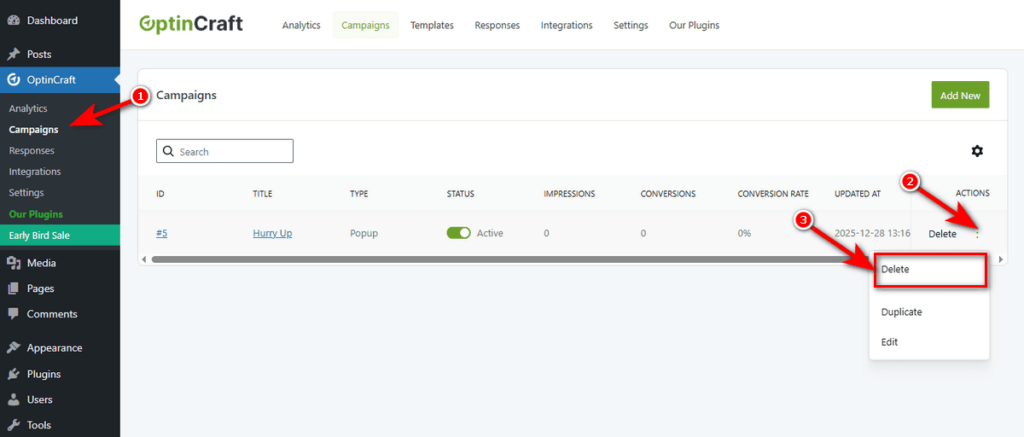
That’s how you can edit, duplicate, or delete a popup campaign using OptinCraft.
Final Thoughts
Editing or deleting a popup campaign allows you to keep your messaging relevant and responsive to changing marketing needs. Whether you are updating a design or removing an outdated offer, quick campaign management helps maintain a consistent and professional user experience.
By regularly reviewing your campaigns in the dashboard, you can ensure only active and effective popups are displayed. This simple practice keeps your marketing efforts organized and aligned with your goals.
Share this blog:

About William Tan
William Tan is a Digital Marketer at Crafium, specializing in WordPress solutions and online growth strategies. He’s passionate about helping businesses expand their digital presence through smart marketing and data-driven insights.