Best Exit-Intent Popup Plugins for WordPress

William Tan
William Tan is a Digital Marketer at Crafium,…

In this article
Exit-intent popups are one of the most effective tools for turning visitors into leads, subscribers, or customers. They detect when someone is about to leave your website and display a timely message, such as a special offer, newsletter signup, or promotional discount.
For WordPress users, there are many exit-intent popup plugins designed to capture attention without disrupting the user experience. The right plugin can help you reduce cart abandonment, grow your email list, and boost conversions.
From simple, lightweight tools for beginners to advanced solutions with A/B testing, targeting rules, and email marketing integrations, these plugins make it easy to engage visitors at the perfect moment.
In this blog post, we’ll explore the best exit-intent popup plugins for WordPress, highlighting their features, benefits, and which ones are ideal for your website goals.
So, without further ado, let’s dig deeper.
How Exit-Intent Popups Work

Exit-intent popups are smart, behavior-driven tools that appear when a visitor is about to leave your website. Instead of showing popups randomly, they detect user intent to exit, giving you a final chance to engage them. Here’s how they function:
1. Detecting mouse movement
Most exit-intent popups track the visitor’s mouse movement. When the cursor moves toward the browser’s close button, back button, or address bar, the popup triggers automatically. This is especially effective on desktop devices, where leaving behavior is easier to detect.
2. Monitoring inactivity
Some plugins can trigger popups based on inactivity or idle time. If a visitor hasn’t interacted with your page for a certain number of seconds, the popup appears to grab their attention before they leave.
3. Scroll-based triggers
Certain exit-intent plugins consider how far a visitor has scrolled on the page. For example, if someone reaches the bottom but doesn’t take any action, a popup can appear with an incentive, like a discount or newsletter signup.
4. Timed popups
While not strictly exit-intent, some popups are timed to appear after a visitor spends a certain amount of time on your page. Combining timing with exit-intent increases the chances of engagement.
5. Targeting specific pages or users
Advanced exit-intent plugins let you customize triggers for specific pages, posts, or visitor types. For example:
- First-time visitors vs. returning visitors
- Product pages vs. blog posts
- Cart abandonment scenarios in eCommerce
6. Benefits of exit-intent technology
- Captures visitors before they leave
- Increases email subscriptions and sales conversions
- Reduces cart abandonment
- Improves user engagement without being intrusive
By understanding how exit-intent popups work, you can strategically implement them to turn leaving visitors into subscribers or customers, all without annoying your audience.
Key Features to Look for in a Plugin
Choosing the right exit‑intent popup plugin means finding one with the features that match your goals, whether that’s growing your email list, reducing cart abandonment, or increasing sales. Here are the most important capabilities to consider:
Easy popup builder
A good plugin should include a visual drag-and-drop editor so you can design popups without coding. Look for pre-made templates, custom layouts, and font, color, and image controls. These tools make it fast and simple to create popups that fit your brand.
Exit-intent and trigger controls
Not all popups should appear the same way. The best plugins let you set when and how popups appear, such as exit-intent detection (mouse movement toward the close bar), time-based triggers (after X seconds), scroll-based triggers (after scrolling a percentage of the page), and inactivity triggers (after no activity for a time).
Targeting and segmentation
Advanced targeting helps show the right message to the right visitor. Useful options include page-specific rules (shop vs. blog), visitor behavior (new vs. returning), geolocation or device type targeting, and cart value thresholds (show only if cart isn’t empty).
A/B testing
A/B testing lets you compare two or more popup versions to see which performs better. This is essential for optimizing conversion rates because you can test headlines, offers, colors, and designs.
Integrations with Email and CRM tools
Most exit-intent popups aim to collect email addresses or leads, so seamless integration with email marketing services is important. Look for plugins that connect with Mailchimp, Klaviyo, ActiveCampaign, HubSpot, or ConvertKit, plus support for exporting leads or adding them directly to automation workflows.
Analytics and performance tracking
A powerful plugin should provide clear reporting so you can measure views and impressions, conversion rates, and click-through performance. This data helps you refine your strategy and improve results over time.
Mobile responsiveness
With many visitors browsing from phones and tablets, make sure the plugin creates mobile-friendly popups. Responsive design ensures your messages look great and stay usable on all screen sizes.
Speed and performance impact
Some plugins can slow down your site. Choose lightweight options that load asynchronously, don’t block core resources, and offer performance optimization features. This protects your page speed and SEO.
Top Exit-Intent Popup Plugins for WordPress
When it comes to capturing abandoning visitors and turning them into leads or customers, these three exit‑intent popup plugins stand out for WordPress users.
1. OptinCraft
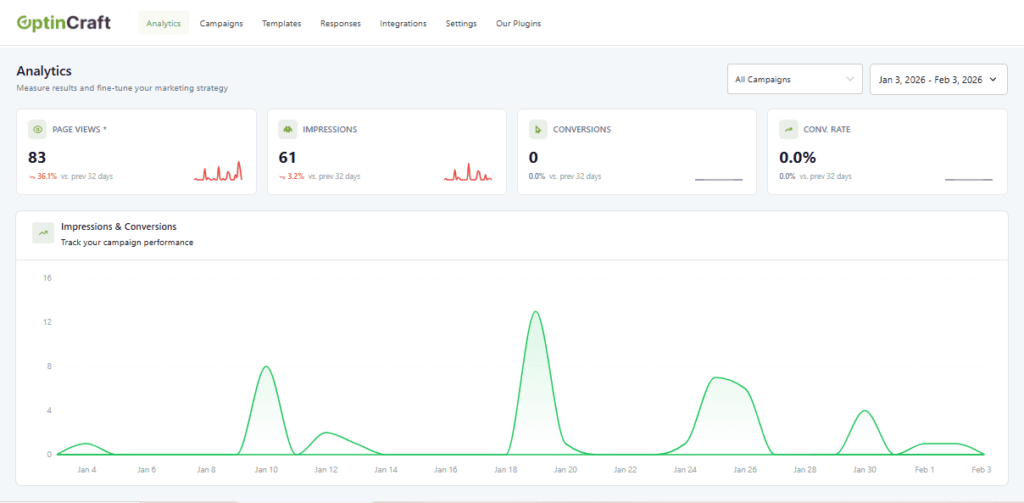
OptinCraft is a feature‑rich exit‑intent popup plugin built for businesses that want maximum conversions with minimal friction. It’s designed to help you capture leads, grow your email list, and boost sales using smart, behavior‑driven popups that trigger right when a visitor is about to leave.
Key Strengths of OptinCraft
Advanced Exit‑Intent Technology
OptinCraft uses precise behavior tracking to detect when a visitor is likely to leave your site, including mouse movements, scroll behavior, and timing so your message appears at the perfect moment.
Customizable Popups That Convert
With a drag‑and‑drop builder and a library of professional templates, OptinCraft makes it easy to design popups that match your brand and messaging. You can customize layouts, fonts, colors, images, and more without coding.
Smart Targeting and Personalization
OptinCraft lets you show tailored messages based on visitor behavior, page type, device, and referral source. That means fewer generic popups and more relevant offers that actually convert.
Built‑In A/B Testing
Test different designs, headlines, and offers to see what resonates best. OptinCraft’s analytics dashboard shows performance metrics so you can refine your campaigns for higher engagement and conversion rates.
Seamless Integrations
Connect OptinCraft with your favorite email marketing and CRM tools like Mailchimp, FluentCRM ActiveCampaign, HubSpot, Zoho, and more so leads go directly into your workflows, automations, or lists.
Performance‑Optimized
OptinCraft is optimized for fast load times and minimal performance impact, helping you boost conversions without slowing down your WordPress site.
Best For:
Businesses, bloggers, eCommerce stores, and marketers who want a powerful yet user‑friendly exit‑intent solution that delivers measurable results.
2. Poptics

Poptics is a flexible and user‑friendly popup plugin that helps WordPress sites boost engagement and conversions with smart exit‑intent and behavior triggers. It’s known for its simplicity and ease of use if you want powerful results without complexity.
Core Features of Poptics
- Visual Popup Builder: Design popups using an intuitive interface with ready‑made templates you can customize to match your brand.
- Multiple Triggers: Besides exit‑intent detection, Poptics supports time‑based and scroll‑based triggers so you can experiment with different engagement tactics.
- Targeting Rules: Configure rules to display popups on specific pages, for certain user roles, or depending on visitor behavior patterns.
- Email Integrations: Easily connect with major email marketing services to send captured leads directly into lists or automations.
- Behavior Analytics: Track key performance indicators like impressions and conversions to understand how well your popups are performing and where you can optimize.
Poptics balances ease of use with meaningful control, making it a great choice for beginners and intermediate users who want versatile exit‑intent popups with effective display logic and analytics.
Best For:
Business owners, bloggers, and site managers who want a straightforward, visually approachable plugin with essential automation and performance insights.
3. WowOptin
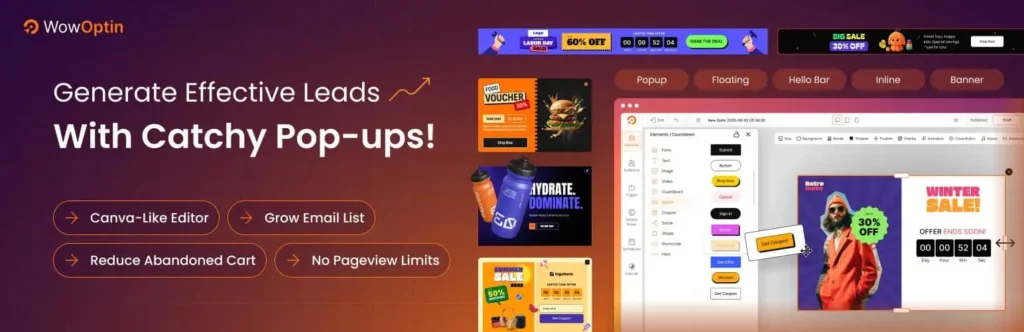
WowOptin focuses on creative flexibility and engaging visuals to help you capture attention with exit‑intent popups that don’t just appear but they wow your visitors. It’s ideal if design and user experience are top priorities for your campaigns.
Standout Features of WowOptin
- Design‑First Templates: Choose from a variety of modern and visually appealing popup designs crafted to maximize attention and engagement.
- Drag‑and‑Drop Editor: Customize every element of your popup including layout, fonts, images, and animations with an easy‑to‑use editor.
- Comprehensive Display Rules: Set conditions based on exit intent, scroll depth, time on page, returning visitors, and more. This flexibility helps you tailor messages to diverse visitor actions.
- Responsive and Mobile‑Friendly: WowOptin ensures popups look great on desktops, tablets, and mobile devices so you don’t sacrifice usability for style.
- Performance Feedback: View metrics on popup views, conversions, and engagement to refine your designs and offers.
WowOptin’s strength lies in its creative freedom and visual flair, making it a great option for brands that want popups to feel like a natural part of their site design rather than an interruption.
Best For:
Design‑focused marketers, creative businesses, and anyone who wants highly customizable, visually engaging exit‑intent campaigns.
Conclusion
Exit-intent popups can play a crucial role in capturing visitors’ attention before they leave a website. The right plugin helps engage users, grow email lists, and reduce bounce rates effectively. When choosing a solution, it is important to consider factors such as ease of use, customization options, targeting capabilities, and overall impact on user experience.
Testing different approaches and monitoring performance can help identify the most effective strategy. With the right implementation, exit-intent popups can turn potential lost opportunities into meaningful engagement and long-term growth.
Tags:
Share this blog:

About William Tan
William Tan is a Digital Marketer at Crafium, specializing in WordPress solutions and online growth strategies. He’s passionate about helping businesses expand their digital presence through smart marketing and data-driven insights.