How to Integrate Email Notification with a Popup Plugin

Md Hamim Khan
Md. Hamim Khan is the Co-Founder and CEO…
In this article
Your popup does its job. It grabs attention and collects responses. But once the user clicks submit, the trail often goes cold.
Without email notifications, leads go unnoticed. Questions sit unanswered. Valuable opportunities quietly disappear. Every missed alert is a potential customer lost to a faster, more responsive competitor.
By integrating email notifications with your popup plugin, you stay instantly informed whenever a user takes action. Submissions reach your inbox in real time, helping you respond faster, stay organized, and turn interest into results.
In this guide, we’ll walk you through the integration step by step so nothing slips through again.
We’ll use the powerful WordPress popup plugin called OptinCraft for the integration.
Benefits of Integrating Email Notifications
Before integrating email notifications, it’s important to understand how they can transform the way you manage leads. Notifications keep you connected, responsive, and organized without extra effort.
i. Instant awareness of new submissions
You get notified the moment someone interacts with your popup. No delays, no missed messages, and no need to constantly check your dashboard. Immediate awareness helps you act fast and stay on top of your leads.
ii. Faster response times
Email notifications allow you or your team to respond quickly to inquiries, signups, or requests. Faster replies improve customer satisfaction and increase the chances of converting leads into clients or subscribers.
iii. Improved lead management
Notifications help you track and organize leads more efficiently. You can quickly see who submitted what, prioritize follow-ups, and maintain a smooth workflow without losing important data.
iv. Reduced risk of missed opportunities
Without notifications, submissions can go unnoticed, costing potential customers or valuable feedback. Email alerts ensure nothing slips through the cracks, maximizing your conversion opportunities.
v. Automation and workflow integration
Email notifications can be tied to other tools, like CRMs, marketing platforms, or team chat apps. This makes it easier to automate tasks, assign follow-ups, and integrate popup data into your overall business workflow.
vi. Enhanced professionalism and reliability
Prompt notifications give your team a professional edge. Users feel acknowledged, your brand looks responsive, and your business gains credibility simply by being quick to react.
How to Integrate Email Notification with OptinCraft
OptinCraft comes with the Email Notification setting. It ensures you or your team get notified the moment a visitor engages with your campaign, allowing for immediate follow-up.
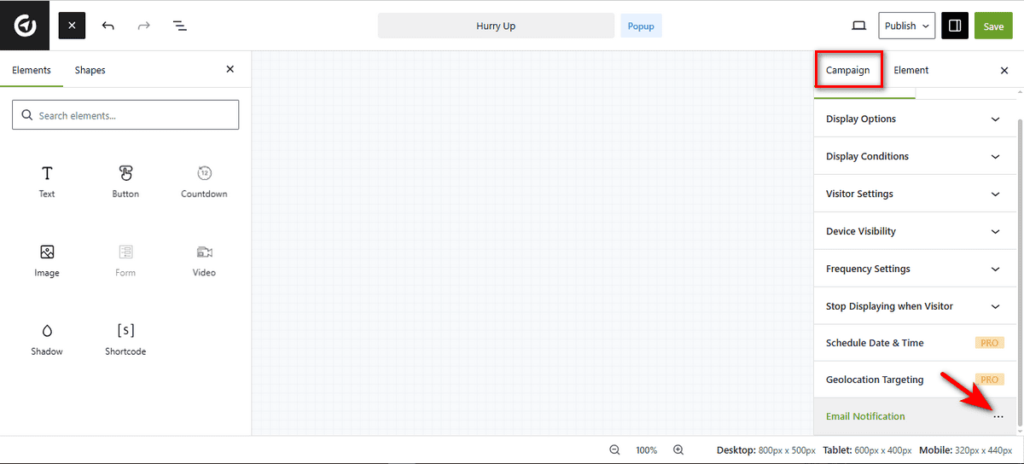
Let’s set it up. To do that, open your target campaign in the Canvas Builder.
Then, look at the right sidebar. Scroll down to the bottom and click on the “Email Notification” tab under ‘Campaign’ to open the integrations menu.
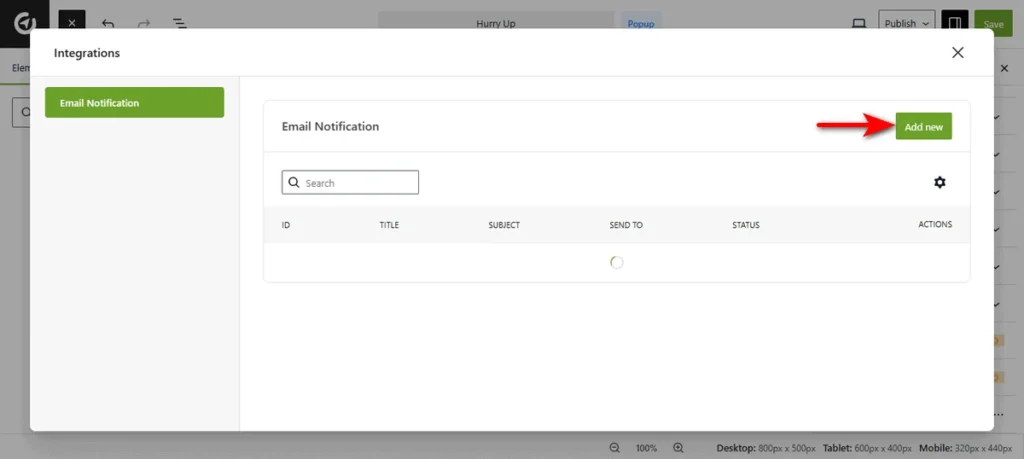
At this moment, a modal window titled ‘Integrations’ will appear. Now, click the “Add new” button to start configuring your alert.
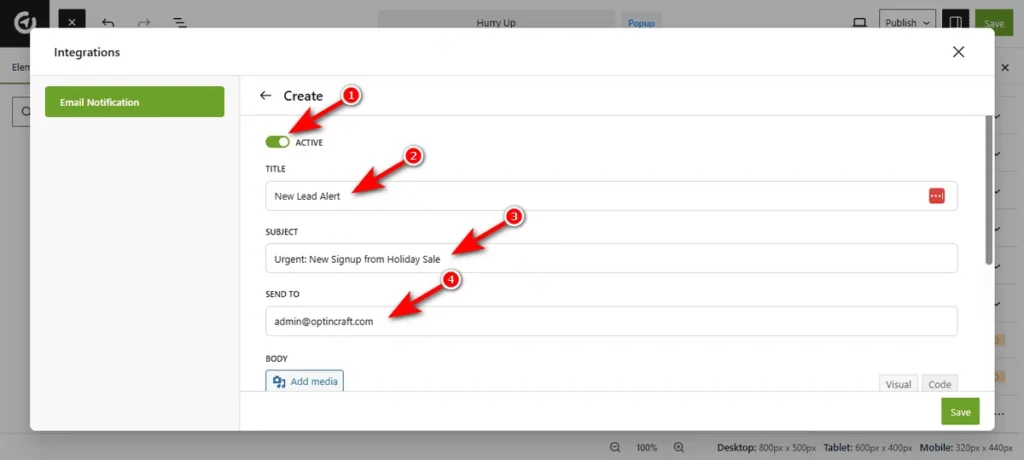
Afterward, you need to configure delivery details. Here are the options you’ll get at this stage.
- Active: Toggle this switch to On to ensure the notification is live and running.
- Title: Enter a name for these notification settings. This is for your internal reference.
- Subject: Write the subject line that will appear in your email inbox.
- Send To: Enter the email address where you want to receive these notifications.
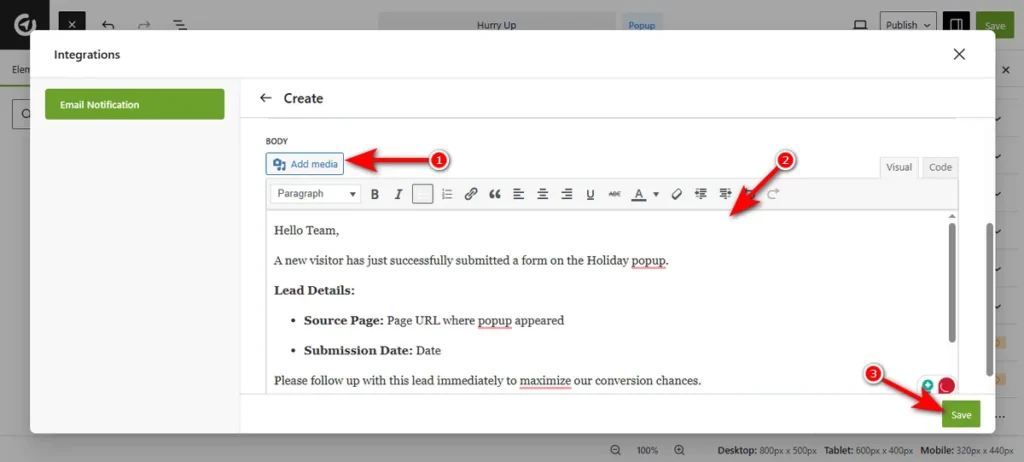
Finally, design the email content using the built-in editor.
Add Media: Click this button if you need to insert images, such as your company logo, into the email body.
Body Editor: Use the rich text editor to write your message. You can format text, add links, and structure the data to make it easy to read.
Save: Once you are satisfied with the setup, click the ‘Save’ button at the bottom right to activate the notification.
This is how effortlessly you can enable email notifications with a WordPress popup plugin like OptinCraft.
Final Thoughts
Integrating email notifications with your popup plugin makes sure you never miss a lead. Every submission reaches you instantly, helping you respond faster and stay organized.
With this simple setup, your popups become a powerful tool for managing leads and boosting conversions. Follow the steps, and you’ll turn every interaction into an opportunity.
Share this blog:

About Md Hamim Khan
Md. Hamim Khan is the Co-Founder and CEO of Crafium, leading the company’s vision, growth, and product strategy across its digital and software ventures. With 5+ years of experience in tech and digital marketing, he focuses on building products, driving sustainable growth, and turning ideas into scalable businesses.